|
|
The Ultra 64, famously, has 4 kilobytes of texture memory, which is... not much. For reference, the 3dfx Voodoo, also from 1996, has 2 megabytes of texture memory; modern graphics cards have many times more than that. As a result, developers needed to be savvy with the way that they formatted their textures. This is mostly what this article is going to be about, through the actual mechanics of making a texture in The GIMP will also be covered just for completeness's sake. There should also be a portion dedicated to thinking about textures artistically toward the bottom. To start with, you will need an image editing software of some kind, likely two. At minimum, you'll need something like The GNU Image Manipulation Program (The GIMP for short), Adobe Photoshop, Paint Shop Pro, or something of the sort for basic image manipulation tasks, and ideally on top of that either a sprite editor (e.g. Aseprite) or a digital painting program (the one I use and thus the one you'll be seeing in this is FireAlpaca) for the majority of the work in creating the textures. These offer more advanced drawing tools for either style you choose to go for than a more general program like The GIMP.
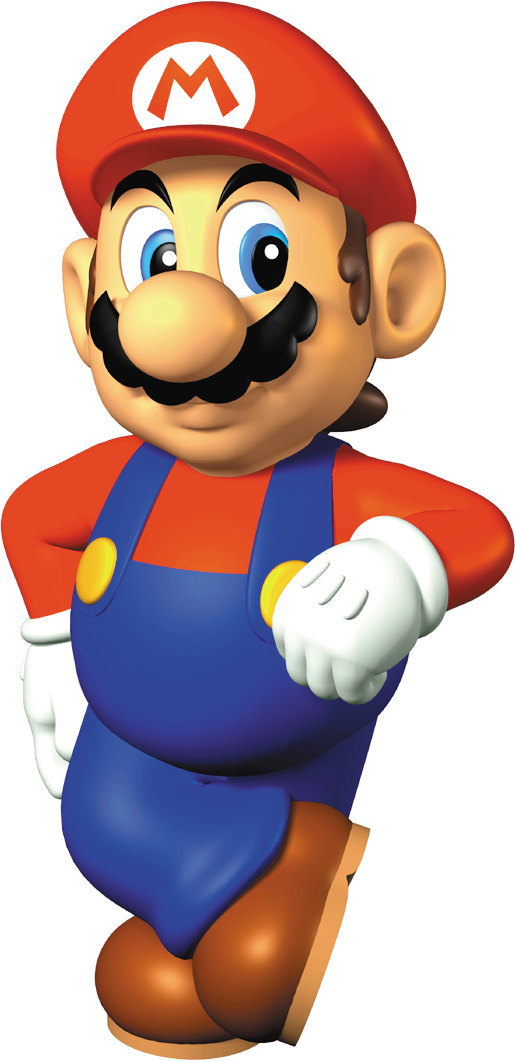
A texture is ultimately an image that you paste over polygons to give them more detail than your polygon budget would allow. They wouldn't even be necessary if we had many millions of polygons at our disposal like on modern computer hardware, or if the style you are going for isn't particularly detailed; many surfaces in, e.g. Super Mario 64 such as most of Mario's model is flat colored. On his model, the only textures are the buttons, moustache, eyes, and the letter M on his cap. This doesn't look strange to us because the official art style really is that simplistic; Mario's shapes and base colors generally go uncluttered.

|
|
Mario model from Super Mario 64.
Credit to The
Cutting Room Floor user CreamDream.
|
Mario promotional render model from
Super Mario 64.
|
For many things, this is sufficient. Painted objects that are a single color, such as a desk lamp, can get away with only one or two textures and the rest of the model be vertex colored.
Telephone/facsimile/letters
|
Unfortunately, I'm not accepting phone, fax, or letter communications at this time. Use email, reach out on the forums, or a social media service as shown below:
To reach out via the Fediverse, send your attention to:
@lepidotos@bitbang.socialFor Discord, send me an email to get access. I am interested in Fluxer, Element, and plain old IRC (I used to use IRC plenty back in the day), but I haven't spent the time to use them long-term. For now I don't have a presence on either, but whichever the Ultra 64 modding and homebrew community moves to either en-masse if they do migrate, that will probably be the place I go too. The places I'm not at: Twitter, Facebook, Bluesky, Instagram, Snapchat, or Whatsapp. The place I'd love to be again: iSketch.
|
|
|
|
|
|
|

n64brew Wiki
The
frontier of all Ultra 64 knowledge, and an
in-dispensable tool in creating this
website. Offers a community-editable (and so potentially the
most up to date) repository of know-ledge
for programming the system however you decide to.
n64squid
A
fellow Ultra 64 fansite. Very comprehensive and updates regularly, so go give them a look!
Nintendo 64 Forever
A forum for the console that I've found
helpful in the past. Donations
Running this site isn't super cheap (actually, the hosting service is pretty good, they start at a dollar a month and let me have more than enough resources for this site, it's the .info tld registration that's the real killer), so helping out is always good.
For a little while, this is also going to be how you get access to the forums.
I would rather not do that and just have them be free to access, but it's a
spam reduction feature since I don't have time to full-time administrate and
moderate them. They will still be fully public and search engine indexable, though.
|
|
|
|
|
|
|
|
|
|
|
|